

Help Center
HOME >HELP CENTER
User Profile
New Registration & Login
Is registration on Infinity Housing FREE? Where to register?
✅ Yes! Registration on Infinity Housing is completely FREE.
You can easily create your account and start exploring properties right away.
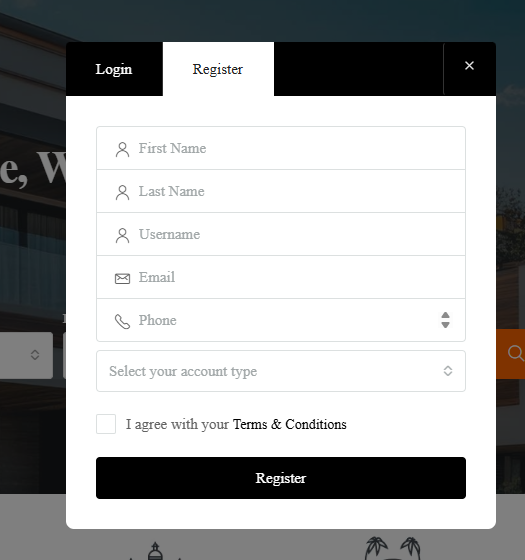
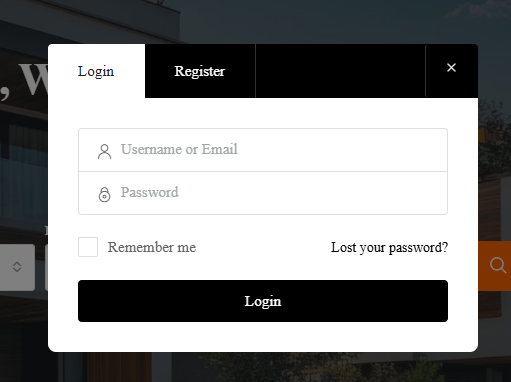
I have multiple email accounts and don’t remember which one is linked to my Infinity Housing account.
Go to the Login page — click “LOGIN” (top-right corner of the homepage).
Click on “Forgot Password?” below the login form.
Enter each of your possible email addresses one by one.
If the email is registered, you’ll get a password reset email from Infinity Housing.
If it’s not registered, you’ll see an error like “No user found with this email address.”
The email that successfully receives the password reset link is the one registered with your account.
After confirming, you can log in normally or reset your password if needed.
I forgot my email and password. How can I access my account?
- Go to the Login Page
Click the “Login” button located at the top-right corner of the homepage.
The Login Modal will appear.
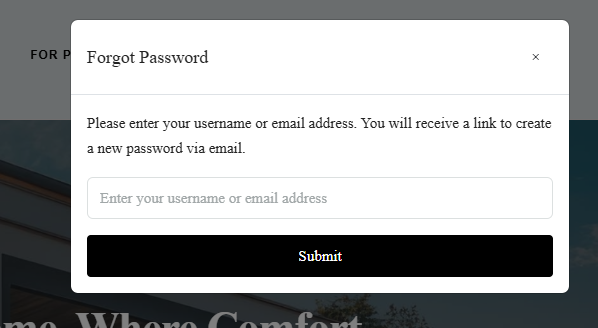
- Try the “Forgot Password?” Option
If you remember your registered email, click “Forgot Password?”
Enter your email and check your inbox for a reset link
If You Forgot Both Email and Password
Since the password recovery link requires your email, please contact the Infinity Housing Support Team.
Use the Contact Us form or the Support Email (found in the site’s footer or Contact page).
Provide your full name, phone number, and any property inquiry details you may have used before — this helps verify your account.
After Verification
The support team will confirm your registered email and help you reset your password.
Once reset, you can log in again via the “Login” button.
I am not able to login through my mobile number. What to do?
In the event that you are unable to access your account via your registered mobile number, kindly reach out to us at support@infinityhosuing.in
I can’t log in with my email ID. How can I access my account?
Having trouble logging in with your email? Contact our support team at support@infinityhousing.in, and we’ll help you regain access.
Can I Login Without My Email on Infinity Housing?
There’s no direct way to log in without an email or username, because it is used to verify your account securely.
- Infinity Housing allow logging in with a username instead of an email. Check if your account has a username set up.
Contact Support
If you cannot remember your email or username, contact the site support:
support@infinityhousing.inProvide your full name and any details linked to your account (phone number, property inquiries) for verification.
The support team will help you recover your account safely.
Is registration required to post a property on Infinity Housing?
Yes, new users need to register before posting a property on Infinity Housing. The registration is a simple, one-time process that takes only a few minutes. Once registered, it becomes easier for us to connect you with potential buyers who are interested in properties like yours.
Account Deactivation/ Re-activation
What steps should I follow to deactivate my account?
Log in to Your Account
Go to the website and click “Login / Register”.
Enter your username and password to access your user dashboard.
Open the User Dashboard
After logging in, you’ll be redirected to your Dashboard (usually at
/dashboard/).You’ll see tabs like My Properties, Saved Searches, Profile, etc.
Go to the Profile Settings
In the left-hand menu, click Profile or My Profile.
Scroll down to the bottom of the profile settings page.
Find the “Deactivate Account” Option
Infinity Housing includes a “Deactivate Account” or “Delete My Account” button (depending on your version and configuration).
You’ll usually see a button labelled:
🗑️ Deactivate Account
Confirm Deactivation
Click the button and confirm your action in the pop-up message.
Your account will be deactivated or permanently deleted, and you’ll be logged out automatically.
I’ve rented or sold my place and don’t need my account anymore. How do I deactivate it?
Log in to Your Account
Go to the website and click “Login / Register”.
Enter your username and password to access your dashboard.
Go to Your Dashboard
Once logged in, you’ll be redirected to your Dashboard page.
You’ll see menu options such as My Properties, Profile, Saved Searches, etc.
(Optional) Mark Your Property as Rented or Sold
Before deactivating your account, you can mark your property as Rented or Sold so it no longer appears as available.
To do this:
Go to My Properties.
Click Edit on the property listing.
Change the Property Status to Rented or Sold.
Click Update Property.
Deactivate Your Account
After updating your property status, go to the Profile section in your dashboard.
Scroll down to the bottom of the page.
Click the “Deactivate Account” or “Delete My Account” button.
Confirm the action when prompted.
You’re Done
Your account will be deactivated, and you’ll be automatically logged out.
How can I reactivate my account?
If you chose Delete Account instead of Deactivate Account, your profile and listings may have been permanently removed.
Please contact us at support@infinityhousing.in using your registered email ID to request account reactivation.
Can I use my current profile to reactivate my account?
Infinity Housing allows for soft deactivation, meaning your account is temporarily disabled but not deleted.
✅ In this case, your current profile remains intact.
How to reactivate:
Go to the website’s Login page.
Enter your existing username/email and password.
Once logged in, your account is automatically reactivated.
Your property listings, saved searches, and profile information will still be available.
How do I get my account back if it was deactivated through the online mailer?
If your Infinity Housing account was deactivated through an online mailer (for example, via a deactivation link sent to your email), you can usually reactivate it by following the steps below:
Check Your Email Inbox
Look for the account deactivation email you received.
Often, this email contains a “Reactivate Account” or “Restore Account” link.
Click the Reactivation Link
Clicking the link will take you to a confirmation page on the website.
This automatically restores your account to active status.
Log In to Your Dashboard
Use your existing username/email and password.
Once logged in, your account will be fully active again, and your profile, listings, and saved searches will be available.
If the Link Has Expired
Contact the website administrator or support team to request a new reactivation link.
Password Setting
I need to reset my password—how do I do that?
1️⃣ Via the Login Page
Go to the Login / Register page on the website.
Click the “Lost your password?” link (usually below the login form).
Enter the email address associated with your Infinity Housing account.
Click “Reset Password”.
Check your email inbox for a password reset email from the website.
Click the password reset link in the email and set a new password.
Once set, you can log in using your new password.
2️⃣ Via the User Dashboard (Logged In)
If you’re already logged in and want to change your password:
Go to your Dashboard → Profile.
Scroll down to the Change Password section.
Enter your current password and new password.
Click Save Changes.
Your password is now updated.
I have forgotten my password. Is it possible to receive it via email or mobile?
Go to the Login / Register page on the website.
Click “Lost your password?” (usually below the login form).
Enter the email address associated with your account.
Click “Reset Password”.
Check your email inbox for a password reset link.
Click the link and set a new password.
How can I make my password strong?
To keep your account secure, please make sure your password meets the following criteria:
Your password length should be between 8 and 14 characters.
Include at least one numeric digit (e.g., 0–9).
Include at least one special character from the following:
! @ # $ % ^ & * _Include at least one alphabet character — using a mix of uppercase and lowercase letters is recommended for added security.
My Profile
I created my account using the wrong email address. How can I fix it?
If you’ve created your account with the wrong email ID, don’t worry — you can easily update it by following the steps below:
🪄 Option 1: Update from Your Profile
Log in to your Houzez account.
Go to your User Dashboard → Profile Settings.
In the Email Address field, enter your correct email ID.
Click Save Changes to update your details.
Once saved, you’ll receive a confirmation email at your new address.
🧭 Option 2: Contact Support
If you’re unable to access your account or made a critical typo in your email, please reach out to our Support Team.
Provide your username, incorrect email, and the correct email address you’d like to use — our team will verify and update it for you.📩 Support Email: support@infinityhousing.in
🕓 Response Time: Within 24–48 hours
I would like to update my registered email ID. Is that possible?
Yes, it’s possible to update your registered email ID in your Infinity Housing account. Follow the simple steps below to make the change:
🪄 How to Update Your Email
-
Log in to your Infinity Housing account.
-
Navigate to your User Dashboard → Profile Settings.
-
Locate the Email Address field.
-
Enter your new email ID and click Save Changes.
Once saved, a confirmation message will be sent to your new email address to verify the update.
⚙️ Need Help?
If you can’t access your account or entered an incorrect email during registration, contact our Support Team for assistance.
Provide your username, your old email address, and the new email address you’d like to register.
📩 Support Email: support@infinityhousing.in
🕓 Response Time: Within 24–48 hours
How can I update my alternate email address?
Log in to your Infinity Housing account.
Go to your User Dashboard → Profile Settings.
Scroll to the Alternate Email Address section.
Enter your new alternate email ID.
Click Save Changes to update your information.
Can I change my existing profile type? If so, what steps should I follow?
If you chose update your profile type,
Please contact us at support@infinityhousing.in using your registered email ID to request for update profile type.
What is the process to update my profile name?
Keeping your profile name up to date helps ensure your clients and visitors see the correct information. You can easily update it in your Infinity Housing account.
Log in to your Infinity Housing account.
Navigate to User Dashboard → Profile Settings.
Find the Name field and enter your new profile name.
Click Save Changes to update your profile.
Once updated, your new name will appear across your listings, profile, and contact information.
How can I update the city in my address?
Keeping your address information up to date ensures accurate property listings and client communication. You can easily update the city in your Infinity Housing account:
Log in to your Infinity Housing account.
Go to User Dashboard → Profile Settings.
Scroll down to the Address section.
Locate the City field and enter your updated city name.
Click Save Changes to apply the update.
Your new city will now reflect on your profile, listings, and contact details.
My Requirement
Is there a way to save my requirement?
Infinity Housing allows you to save your property requirements so you can quickly access them later and receive matching listings. Follow these simple steps:
🪄 How to Save Your Requirement
-
Log in to your Infinity Housing account.
-
Go to My Requirements (or the Saved Searches section in your dashboard).
-
Click Add New Requirement or Save Search.
-
Fill in the details of your requirement: property type, location, budget, and other preferences.
-
Click Save to store your requirement.
Your requirement will now be saved in your dashboard for easy access. You will also receive notifications or updates whenever a matching property is available.
How do I set up a property alert?
Stay updated on the latest properties that match your preferences by setting up a property alert in Infinity Housing.
Log in to your Infinity Housing account.
Go to My Property Alerts (or Saved Searches) in your dashboard.
Click Add New Alert.
Fill in the criteria for your alert: property type, location, price range, and other preferences.
Click Save Alert to activate notifications.
Once set, you’ll receive email notifications whenever new properties match your saved criteria.
Can you tell me how to stop these email notifications?
If you’re receiving too many emails from Infinity Housing, you can manage or unsubscribe from them easily.
Log in to your Infinity Housing account.
Go to User Dashboard → Profile Settings → Email Preferences (or Notifications).
Review the list of email notifications.
Uncheck the notifications you no longer want to receive.
Click Save Changes to update your preferences.
Alternatively, you can unsubscribe directly from any marketing email by clicking the “Unsubscribe” link at the bottom of the email.
Can I get an update on the status of my complaint?
Infinity Housing allows you to track the progress of any complaints or support requests you’ve submitted.
Log in to your Infinity Housing account.
Go to User Dashboard → Support / Complaints section.
Locate your submitted complaint in the list.
Click on the complaint to view its current status and any updates from the support team.
How do I submit an issue or complaint to the support team?
If you encounter any issues or need assistance, you can easily raise a complaint with the Infinity Housing support team.
Log in to your Infinity Housing account.
Go to User Dashboard → Support / Complaints section.
Click Add New Complaint or Submit Issue.
Fill in the required details:
Subject or issue title
Description of the problem
Any supporting files or screenshots (if applicable)
Click Submit to send your complaint to our support team.
Once submitted, you will receive a confirmation with a complaint reference number for tracking.
My Recommendations
Where do I find the Infinity Housing recommended properties?
Infinity Housing helps you discover properties that match your preferences and requirements. Follow these steps to see recommended listings:
Log in to your Infinity Housing account.
Navigate to the Recommendations section.
Browse through the list of properties suggested by Magicbricks based on your saved preferences.
You can click on any property to view details, save it for later, or set alerts for similar listings.
I am getting too many emails. How do I unsubscribe?
If you’re receiving too many emails from Infinity Housing, you can manage or unsubscribe from them easily.
Log in to your Infinity Housing account.
Go to User Dashboard → Profile Settings → Email Preferences (or Notifications).
Review the list of email notifications.
Uncheck the notifications you no longer want to receive.
Click Save Changes to update your preferences.
Alternatively, you can unsubscribe directly from any marketing email by clicking the “Unsubscribe” link at the bottom of the email.
Update Email Address
How do I change the email linked to my account?
Keeping your registered email up to date ensures you receive all notifications, property alerts, and account-related communications.
🪄 Steps to Update Your Email
Log in to your Infinity Housing account.
Navigate to User Dashboard → Profile Settings.
Locate the Email Address field.
Enter your new email address.
Click Save Changes to update your account.
After updating, a verification email will be sent to your new email address. Make sure to verify it to continue receiving all notifications.
Can my backup email be used as my primary email?
Yes! On Infinity Housing websites, you can update your account to use your alternate email as your primary email.
🪄 How to Switch Your Alternate Email to Primary
Log in to your Infinity Housing account.
Go to User Dashboard → Profile Settings.
Locate the Email Address section.
Replace your current primary email with your alternate email.
Click Save Changes.
A verification email will be sent to your new primary email. Make sure to verify it to ensure all notifications and alerts are correctly delivered.
Update Mobile Number
Can I modify the mobile number linked to my account?
Keeping your mobile number updated ensures you receive property alerts, OTPs, and important notifications.
🪄 Steps to Update Your Mobile Number
-
Log in to your Infinity Housing account.
-
Go to User Dashboard → Profile Settings.
-
Locate the Mobile Number field.
-
Enter your new mobile number.
-
Click Save Changes to update your account.
A verification code (OTP) will be sent to your new mobile number. Enter the OTP to confirm and activate your updated number.
I’ve lost my phone. How can I access my account?
If you’ve lost your phone, don’t worry! You can still access your Infinity Housing account using these steps:
🪄 Steps to Recover Access
-
-
Use Your Email: Log in with your registered email address and password instead of your mobile number.
-
Reset OTP-Based Login: If your account uses OTP for login, select “Use Email for OTP” or “Resend OTP to Alternate Email”.
-
Update Mobile Number: Once logged in, immediately go to User Dashboard → Profile Settings → Mobile Number to add a new number for future OTPs.
-
Verify New Number: Enter the OTP sent to your new mobile number to complete the update.
-
⚙️ Need Assistance?
If you cannot log in using email or OTP, contact our Support Team with your username and registered email. They will guide you through secure account recovery.
📩 Support Email: support@infinityhousing.in
🕓 Response Time: Within 24–48 hours
is it possible to create an account without providing a mobile number?
Yes! On Infinity Housing websites, you can create an account without a mobile number, although linking one is recommended for enhanced security and faster notifications.
🪄 How to Register Without a Mobile Number
-
Go to the Sign Up / Register page.
-
Enter your email address, name, and password.
-
Skip the mobile number field (if optional).
-
Click Create Account.
You may need to verify your email address by clicking the verification link sent to your inbox.
⚙️ Benefits of Adding a Mobile Number Later
-
Receive property alerts instantly.
-
Enable OTP-based login for added security.
-
Recover your account easily if you forget your password.
I no longer use my registered mobile number. How can I update it with a new one?
If you no longer use your registered mobile number, you can update it in your Infinity Housing account to continue receiving OTPs, alerts, and notifications.
🪄 Steps to Update Your Mobile Number
-
Log in to your Infinity Housing account using your email address and password.
-
Go to User Dashboard → Profile Settings → Mobile Number.
-
Enter your new mobile number.
-
Click Save Changes.
-
Verify the new number by entering the OTP sent to it.
⚙️ Can’t Access Your Account?
If you cannot log in because your old number was required for OTP, contact our Support Team with your username and registered email. They will assist you in updating your mobile number securely.
📩 Support Email: support@infinityhousing.in
🕓 Response Time: Within 24–48 hours
My registered mobile number isn’t receiving texts. How do I resolve this?
If you’ve been expecting a text message (like an OTP) and it hasn’t arrived, here are the steps you should follow to resolve the issue in your Infinity Housing website account:
🪄 What to Do
-
Log in to your User Dashboard → Profile Settings → Mobile Number section.
-
Confirm the mobile number displayed is correct and has no typos.
-
-
Ensure your mobile device has network signal and SMS service is functional.
-
Check for any SMS blocking or filtering settings on your phone or by your mobile carrier.
-
Try requesting the SMS again after waiting a few minutes.
-
If you still don’t receive it, go ahead and change the mobile number to a different active number, then save and verify it.
⚙️ Need Help?
If none of the above tips work, contact our Support Team. Provide your username, registered email, and describe that you’re not receiving SMS on the registered mobile number.
📩 Support Email: support@infinityhousing.in
🕓 Response Time: Within 24–48 hours
Someone else in my family owns the registered mobile number. How do I change it?
If your account’s registered mobile number now belongs to someone else (like another family member) and you want to link your own new number, follow these steps to keep your account secure and up to date.
🪄 Steps to Update Your Mobile Number
-
Log in to your Infinity Housing account.
-
Go to User Dashboard → Profile Settings → Mobile Number.
-
In the Mobile Number field, enter your new mobile number that you currently use.
-
Click Save Changes to submit the update.
-
A verification code (OTP) will be sent to your new mobile number — enter the OTP to confirm and activate the update.
⚙️ What if I Can’t Access the Old Number?
If you are unable to access the account because it requires verification on the old number (which now belongs to someone else), please contact our Support Team.
Provide us with your username, registered email address, and your new mobile number. Our support team will guide you through the verification and mobile number update process.
📩 Support Email: support@infinityhousing.in
🕓 Response Time: Within 24–48 hours
Can I register a new account with a number already linked to another account?
No. On, Infinity Housing websites, a mobile number that is already registered with an existing account cannot be used to create a new account. Each mobile number must be unique to a single account to ensure security, proper notifications, and OTP verification.
Is it possible to create a new account using the same mobile number and email from my deactivated account?
No. On Infinity Housing, once an account is deactivated, the mobile number and email associated with it cannot be immediately reused to create a new account. This policy ensures account security and prevents misuse of credentials.
Contact Support: Reach out to the Infinity Housing Support Team to confirm if your mobile number and email can be reactivated or released for a new account.
Use Alternative Credentials: If immediate access is needed, register a new account using a different email and/or mobile number.
Recover Deactivated Account: In some cases, support may help you reactivate the old account instead of creating a new one.
Account Deactivation/ Re-activation
What precautions should I take to avoid QR code-related fraud?
With the rise of online transactions, QR code frauds have become increasingly common. At Infinity Housing, we are committed to helping you stay safe while transacting online.
⚠️ How QR Code Frauds Happen
Fraudsters posing as tenants: Scammers pretending to book your property may ask you to scan a QR code to transfer the booking amount. Scanning the code can lead to money being debited from your account. Remember: QR codes should only be used to make payments, not to receive them.
Fraudsters posing as property owners: Scammers posing as owners may send a QR code to tenants for token or advance payments. Scanning such a QR code can result in much higher amounts being deducted from the tenant’s bank account.
✅ How to Stay Safe
Never use QR codes to receive money.
Do not enter your UPI PIN to receive payments.
Avoid clicking on suspicious emails asking for personal or banking details.
Make payments only after verifying the identity of the person and signing a formal rent agreement.
Use secure payment channels approved by RBI (UPI, NEFT, IMPS).
For receiving money, the sender only needs your UPI ID or bank account + IFSC code.
If a QR code leads to a website asking for personal details, do not provide any information.